Finding an affordable embroidery machine that still offers solid features can be challenging. The following selections balance cost with capability, including beginner-friendly interfaces, built-in designs, and reliable support. This guide highlights five budget-friendly options that help you start stitching right away, whether you’re creating personalized gifts or small business designs.
| Product | Brand | Key Benefit | Notes |
|---|---|---|---|
| POOLIN EOC06 Embroidery Machine | Poolin | Large embroidery area and beginner-friendly wireless transfer | Includes multiple hoops and USB/wireless transfer |
| Brother SE700 Sewing and Embroidery Machine | Brother | All-in-one sewing and embroidery with wireless transfer | Good starter option with built-in designs and apps |
| Brother PE545 Embroidery Machine | Brother | Compact embroidery field with wireless capabilities | 4×4 hoop; compact for small spaces |
| Brother PE900 Embroidery Machine | Brother | Generous embroidery area and wireless transfer | Higher-end within affordable range |
| Poolin EOC05 Embroidery Machine | Poolin | Educational setup with training and clear workflow | 7″ touchscreen; includes training and design transfer |
Poolin EOC06 Embroidery Machine With 7 Inch Touchscreen

The Poolin EOC06 is a computerized home embroidery machine designed for beginners and hobbyists who want a sizable embroidery area without a steep price. It ships with four hoops—two 5.5×5.5 inch, one 8×8 inch, and a large 7.9×11 inch hoop—making it suitable for clothing, home textiles, and accessories. The machine supports USB and wireless transfers, allowing users to import designs quickly. It also offers a 7.9×11 inch embroidery field, making larger motifs feasible without frequent hoop changes. Built-in designs (200) provide immediate project options, while optional software compatibility supports custom DST or DSB formats. Customer-focused after-sales support is highlighted through social media groups and YouTube tutorials, aiding new users as they learn the workflow.
Key considerations: The setup emphasizes learning and ongoing support, which can be valuable for first-time buyers. When evaluating this model, consider whether you need a broad embroidery area and how much you value wireless transfer versus USB-only design loading. The included hoops cover a wide range of projects, but long-term use may require additional software for advanced pattern creation.
Brother SE700 Sewing And Embroidery Machine

The Brother SE700 combines sewing and embroidery in a compact package. It features a 4×4 inch embroidery field and a 3.7-inch touchscreen, making it approachable for beginners who want a single machine for both functions. A wireless LAN feature enables file transfer from a PC using Design Database Transfer software, while the USB port provides a direct connection option. The SE700 also supports Artsprira Mobile App integration, allowing users to create or download patterns on mobile devices and transfer them wirelessly. This combination of tools makes it a versatile entry point for those who plan to expand sewing and embroidery skills over time.
Important considerations: If your focus is strictly embroidery, you may prefer machines with larger embroidery fields. If you value seamless integration with mobile apps and PC software, the SE700’s connectivity options are a clear advantage. The learning curve remains manageable due to built-in designs and accessible software tools.
Brother PE545 Embroidery Machine
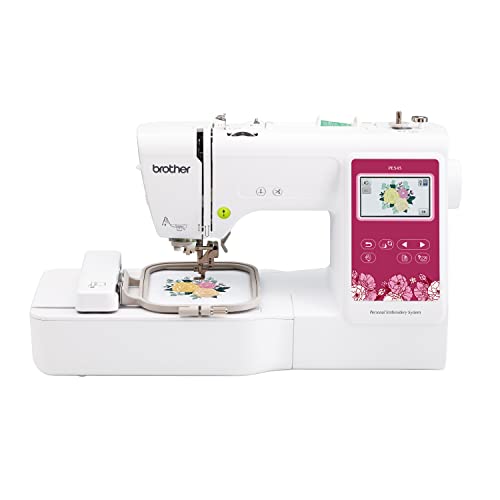
The Brother PE545 focuses on compact embroidery work with a 4×4 inch embroidery field and a large 3.7-inch LCD touchscreen for straightforward operation. It includes a USB port for file transfer and supports integration with the Artsprira Mobile App for pattern design and wireless transfers. This model is well-suited for crafters who primarily embroider on smaller items like clothing patches or tote bags, and it fits comfortably in smaller crafting spaces. The PE545 provides reliable performance in a space-saving package and keeps essential features accessible for beginners exploring embroidery as a hobby or side business.
Key buying angles: It’s a good choice for those who want a dedicated, compact embroidery solution with straightforward controls and essential connectivity. If you anticipate growing into larger designs, you may later need a machine with a bigger embroidery field.
Brother PE900 Embroidery Machine
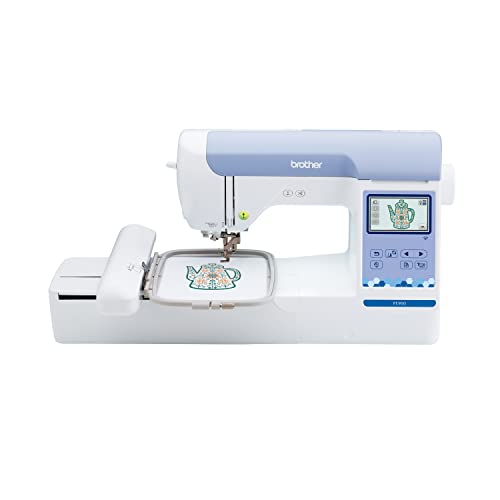
The Brother PE900 expands the embroidery field to 5×7 inches, offering more space for larger motifs while maintaining wireless capability and USB transfer for file loading. The machine supports the Artsprira Mobile App to design patterns on a mobile device and transfer them wirelessly, creating a seamless workflow between design and embroidery. With WLAN, users can access a broader ecosystem of designs while keeping the process efficient. The PE900 is a solid step up for those who appreciate more room for creativity without stepping into professional-grade prices.
Considerations: If you frequently work with larger designs, the 5×7 inch field is advantageous. For beginners, ensure you’re comfortable with wireless pattern transfers and potential app usage for pattern creation. The combination of a larger field and wireless capability makes it a popular upgrade choice within affordable ranges.
Brother SE2000 5×7 Combo Embroidery & Sewing

The Brother SE2000 blends sewing and embroidery with a 5×7 inch embroidery field and a broad accessory kit. It ships with 80 embroidery threads, 50 sewing threads, and a comprehensive set of feet and tools designed to support beginners as they learn. The machine’s bundle approach provides a robust starting point for those who want ready-to-use supplies, reducing initial setup friction. The combination of a sizable embroidery area and a broad kit makes it a strong all-in-one entry option for hobbyists and aspiring small-business crafters alike.
Key points: Bundled thread and foot kits add immediate value, enabling users to begin projects without purchasing extra supplies. The SE2000’s 5×7 inch field supports more ambitious designs, and the inclusion of many feet helps cover a variety of techniques as skills grow.
Brother SE700 Embroidery & Sewing Machine

The Brother SE700 offers a compact, integrated sewing and embroidery experience with 4×4 inch embroidery space and wireless transfer capabilities. It ships with a robust accessory kit to support both sewing and embroidery projects. The device stands out for its workflow efficiency, combining Design Database Transfer software with wireless app connectivity for pattern creation and transfer. This model is well suited for beginners who value an all-in-one approach without sacrificing design flexibility or modern connectivity.
Important considerations: The SE700 is a versatile starting point for those who want to explore both sewing and embroidery. If you plan to work mostly with larger embroidery motifs, you may want to opt for a model with a bigger embroidery field. Users who enjoy mobile design work will appreciate Artsprira App integration and wireless transfers.
Buying Guide: Key Purchase Considerations
- Embroidery area: The size of the embroidery field determines the scale of designs you can tackle in one pass. For larger motifs, look for 5×7 inches or bigger; for small projects, 4×4 inches may suffice.
- Connectivity: Wireless transfers simplify design loading from PCs or mobile devices. Consider whether you prefer USB-only, wireless, or a combination, and whether companion apps are available.
- Built-in designs and fonts: A rich library accelerates you from concept to finished project. More designs are especially helpful for beginners building confidence.
- Hoops and accessories: Check included hoops and whether the machine supports common hoop sizes. Bundled accessories can add immediate value.
- Support and education: After-sale support, online tutorials, and user groups can reduce the learning curve. Look for brands with active communities and official guides.
- All-in-one versus dedicated embroidery: If you want both sewing and embroidery, a combination model can be convenient. If your focus is embroidery, a dedicated machine with a larger field might be preferable.
- Space and noise: Consider the machine’s footprint and noise level, especially if you’re working in a home environment or shared space.
- Software and file formats: Ensure compatibility with common DST/DSB formats and whether come-with software or optional programs fit your workflow.
Across these options, buyers should gauge their planned projects, space, and long-term goals. A balanced approach is to select a machine with a comfortable embroidery area, reliable connectivity, and a support ecosystem that helps you quickly move from first stitches to finished designs.
Add a Comment