Choosing the right printer for high-quality prints involves more than just speed. DPI (dots per inch) directly affects detail, color depth, and image fidelity. This guide highlights five leading options that balance resolution, reliability, and versatility for American homes and small workplaces. Whether you’re crafting photos, posters, or professional proofs, the following selections deliver crisp text, vibrant color, and consistent results across various media. Explore each option, compare key features, and use the buying guide to match specs to your printing projects.
| Product | Brand | Key DPI/Quality Feature |
|---|---|---|
| Zebra ZT411 Thermal Transfer Industrial Printer | Zebra Technologies | 203 dpi; durable industrial quality |
| Canon PIXMA TS9521C All-in-One | Canon | Up to 4800 x 1200 dpi; versatile for crafts |
| Zebra ZD421 Thermal Transfer Desktop Printer | JetSet Label | 203 dpi; reliable desktop solution |
| SUPVAN T200M Portable Printer | SUPVAN | 300 dpi on thermal paper; inkless mobile prints |
| Brother MFC-L2750DW | Brother | Up to 2400 x 600 dpi; monochrome laser with duplex |
Zebra ZT411 Thermal Transfer Printer
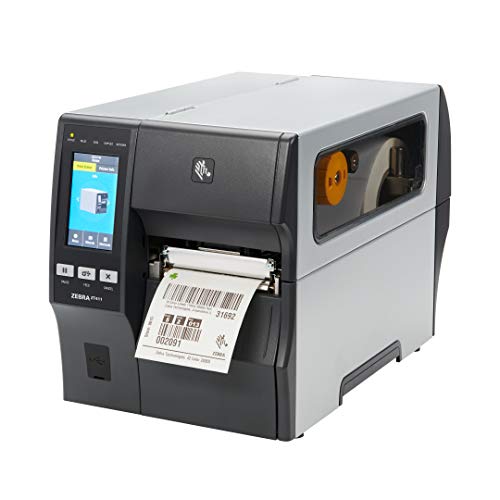
The Zebra ZT411 is built for industrial environments where durability and security matter. It offers 203 dpi resolution with multiple connectivity options including USB, serial, Ethernet, and Bluetooth, accommodating a range of workflow needs. It supports thermal transfer ribbons and direct thermal media, enabling long-lasting prints across a variety of materials. Its bi-fold door design helps it fit into space-constrained areas, and Energy Star qualification signals efficiency over its lifecycle.
Zebra ZD421 Thermal Transfer Desktop Printer

The ZD421 provides a compact desktop option with 203 dpi resolution and straightforward USB or Ethernet connectivity. It is designed for label printing needs in offices and small facilities, supporting 4-inch wide media and reliable performance in a space-saving footprint. The device emphasizes ease of use and steady operation in environments ranging from healthcare to retail, suitable for labeling tasks that require consistent clarity.
SUPVAN T200M Portable Printer

The SUPVAN T200M is a compact, inkless mobile printer that uses thermal printing technology. It delivers 300 dpi print quality without ink or ribbons, relying on thermal paper for crisp text and simple graphics. Its lightweight design (about 1.6 pounds) makes it ideal for travel, fieldwork, and on-the-go document printing. The device supports Bluetooth connectivity for easy pairing with iPhone, Android, and laptops, making it a convenient choice for remote work scenarios.
Brother MFC-L2750DW All-in-One

The Brother MFC-L2750DW is a monochrome laser all-in-one designed for home offices and small workplaces. With a print resolution up to 2400 x 600 dpi and fast speeds, it supports duplex printing, scanning, copying, and faxing. A 2.7-inch touchscreen simplifies task management, and a 50-page ADF accelerates batch work. This model emphasizes efficiency and network sharing while providing reliable black-and-white output for professional documents.
Poster Print On 24″ X 36″ Photo Paper

While not a traditional printer, this offering showcases large-format, high-quality poster printing with 12-color inks and fade-resistant technology. It emphasizes premium photo paper and customizable options, delivering gallery-worthy, long-lasting posters. This product line focuses on achieving vibrant, detailed imagery suitable for displays and gifting while maintaining color accuracy across large sizes.
Liene PixCut S1 Creator Mega Pack

The Liene PixCut S1 packs print, cut, and die-cut capabilities into a single device, delivering 300 dpi prints via thermal dye-sublimation. It includes AI image extraction to convert photos into stickers and supports Bluetooth for mobile workflows. The all-in-one design is geared toward DIY enthusiasts and small businesses seeking streamlined production of customized labels, stickers, and gifts with impressive color fidelity.
Buying Guide: DPI, Media, And Use Case
Key considerations when evaluating DPI and print quality include intended media, color needs, and durability. Industrial printers like the ZT411 emphasize rugged reliability and uptime in demanding workflows, often prioritizing media compatibility and ribbon-based durability over ultra-high DPI. Desktop and consumer options such as the Canon PIXMA TS9521C offer higher native DPI for photo and craft printing with versatile media handling. For portability, the SUPVAN T200M delivers 300 dpi in a compact form, while the Brother MFC-L2750DW provides strong black-and-white output with efficient multi-function features. Choose based on whether your priority is archival quality, vibrant color in posters, or practical document printing.
Key Purchase Considerations
- DPI versus use case: Higher DPI benefits photo printing and fine detail, while text accuracy often suffices at lower resolutions for office tasks.
- Media compatibility: Ensure the printer supports your preferred media widths, cores, and types (labels, photo paper, labels, envelopes).
- Color versus monochrome: If color accuracy and vibrancy are critical, consider inkjet or dye-sublimation options; for sharp text, laser or high-quality monochrome inkjets excel.
- Connectivity and workflow: Look for USB, Ethernet, Wi-Fi, or Bluetooth to suit your setup and multi-user environments.
- Durability and maintenance: Industrial models emphasize ruggedness and serviceability; consumer models prioritize ease of use and replacement parts.
- Media handling and automation: Duplex printing, ADF capacity, and roll-to-label compatibility impact daily throughput and convenience.
Choosing the right DPI-focused printer involves aligning print quality with your typical projects, media, and workspace constraints. The options listed here span industrial, desktop, portable, and all-in-one categories to help you identify a model that matches your needs for sharp detail, vivid color, and reliable operation across different tasks.
Add a Comment