Finding a kid-friendly drawing device that combines creativity with eye protection can be challenging. The following hand-picked drawing tablets for kids emphasize bright screens, durable design, and age-appropriate features so young artists can doodle, learn, and explore without screens getting in the way. Below is a quick table of the chosen products to compare at a glance.
| Product | Brand | Screen Size | |
|---|---|---|---|
| KTEBO 2 Pack 10 Inch LCD Writing Tablet | KTEBO | 10 inches | Two-pack, lightweight, eye-friendly, portable |
| 4 Pack LCD Writing Tablet 8.5 Inch | TQU | 8.5 inches | Bright, pressure-sensitive, four-color options |
| PicassoTab X Drawing Tablet | Simbans | 10 inches | Pre-installed apps, bonus items, standalone |
| Crayola Ultimate Light Board | Crayola | Light-up, tracing-ready | LED light effects, tracing panel |
| LCD Writing Tablet 16 Inch Kinayue | Kinayue | 16 inches | Large screen, rechargeable, eye-friendly |
KTEBO 2 Pack 10 Inch LCD Writing Tablet

The KTEBO 2 Pack includes two 10-inch LCD writing tablets designed for kids ages 3–8. One blue and one pink provide a spare board for twins or siblings. The device reduces mess by allowing kids to draw, count, and spell phrases without ink or markers. The pressure-sensitive, flexible screen is light on the eyes, emitting no radiation or blue light. At about 5 ounces per board and a 0.27-inch ultra-thin profile, these tablets are easy to carry on outings, car trips, or visits to friends and family.
Features encourage independent play and early learning, including writing, drawing, and simple word or math practice. The erase function lets children start fresh in seconds, while the lightweight design supports portability. Parents gain peace of mind from the screen’s eye-friendly construction, which aims to minimize glare and eye strain during extended doodling sessions.
4 Pack LCD Writing Tablet for Kids

This 4-pack from TQU brings a family-friendly value with four 8.5-inch color LCD doodle boards. It uses flexible liquid crystal technology to deliver bright, clear lines and supports pressure-based line thickness for varied artwork. Each board includes an erase button and a lock switch to save drawings if desired. The pens store on top of the board for easy access and the included color variety (Blue, Light Blue, Green, and Pink) helps kids organize ideas by color. An internal button battery powers the long-lasting operation, reducing the frequency of battery changes.
Educational potential spans drawing, writing, spelling, basic math, and notes. Kids can erase in a flash and switch between colors to teach color recognition and sequencing. Durability and ease of use make this set suitable for travel, classroom, or at-home learning activities without the mess of markers or paints.
PicassoTab X Drawing Tablet
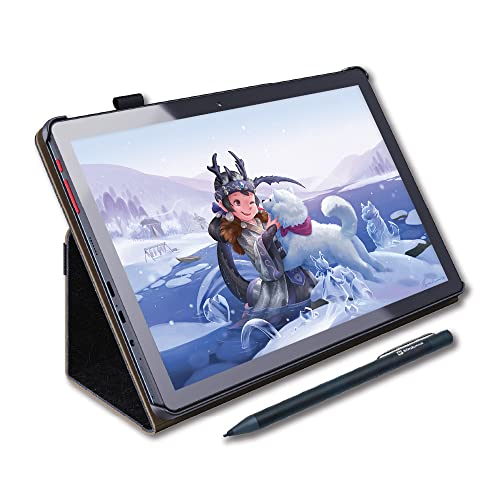
The PicassoTab X from Simbans is a standalone 10-inch drawing tablet designed to run drawing apps and tutorials without a computer. It includes a stylus and four bonus items—case, drawing glove, power adaptor, and screen protector—adding value for beginners. The device is framed as an affordable option for young creatives who want more than a simple doodle board, offering access to digital drawing and animation apps and note-taking in a compact form factor.
Specs highlight a capable processor and a solid storage option (64GB), enabling users to download apps from the Play Store and store drawings locally. Its balance of portability and app-based features makes it suitable for kids transitioning from basic LCD boards to more feature-rich digital drawing experiences, while still staying family-friendly and educational.
Crayola Ultimate Light Board

The Crayola Ultimate Light Board combines a light-up drawing surface with a removable tracing panel for guided art. The kit includes 6 gel markers and a built-in kickstand, making it a versatile option for tracing, freehand drawing, and guided projects. The LED lighting adds a new dimension to creativity, enabling night-time drawing or tracing activities that glow for enhanced visual interest.
While requiring batteries (not included), the light effects and tracing functionality open opportunities for art projects, design exploration, and early STEM-oriented activities like geometry tracing and letter formation. It’s well-suited for kids who enjoy glow-in-the-dark effects or want a more immersive drawing experience than a plain LCD board.
LCD Writing Tablet 16 Inch Kinayue

The Kinayue 16-inch LCD tablet offers a large writing surface that accommodates bigger drawings, spelling practice, and educational activities. Its rechargeable battery design minimizes waste and the USB charging option supports longer sessions between charges. The screen provides an eye-friendly backlit display with reduced glare, delivering brighter colors that are easier to view during extended drawing sessions. This board is particularly suited for at-home learning, travel, and classroom use where a broader canvas can foster more complex projects.
With a focus on safety and longevity, Kinayue emphasizes a durable build and long battery life, making it a practical long-term tool for creative exploration and early STEM learning. The generous screen size helps kids transition from small doodles to more detailed artwork and notes.
Buying Guide: Key Purchase Considerations
- Age and learning goals: For preschoolers, simple erase-and-draw boards with safety features are ideal. Older kids may benefit from larger screens or basic app access for guided learning.
- Screen size and portability: Smaller 8–10 inch boards are highly portable and great for travel, while 12–16 inch models suit classroom or home desks and larger drawings.
- Eye protection: Look for non-glare screens, low blue-light emissions, and passive LCD technology to reduce eye strain during longer sessions.
- Durability and safety: A rounded, sturdy case, non-toxic materials, and secure battery compartments are important for kids’ toys.
- Battery life and charging: Rechargeable options save money and waste; consider models with USB charging for convenience.
- Additional features: Erase/lock function, color options, built-in tracing panels, downloadable apps, and bundled accessories add value for different learning styles.
- Ease of use: Simple two-button erase or one-touch erase typically suits younger children best, while older kids may enjoy multiple features and color choices.
- Value and longevity: A multi-pack may be cost-efficient for families with multiple children, while higher-end tablets with apps can grow with a child’s evolving interests.
Add a Comment