If you’re crafting with a Cricut, keeping your projects, designs, and supplies neatly organized saves time and boosts creativity. This guide highlights top file organizers and essential Cricut accessories that streamline storage, design planning, and execution. Whether you’re managing paper documents, vinyl sheets, or project components, the right solutions help you stay focused on the craft, not clutter.
| Product | Brand | Type | Key Benefit |
|---|---|---|---|
| Advantus Expandable Paper Organizer | Advantus | Accordion File Organizer | 12 pockets, expandable for growing files |
| Accordion File Organizer (Vanulee) | Vanulee | Expanding File Box | 12 pockets, portable with handle |
| Cricut Transfer Tape | Cricut | Vinyl Transfer Tape | Easy transfer for vinyl projects |
| Cricut Knife Blade & Drive Housing | Cricut | Cutting Blade | Thick materials cutting capability |
| Cricut Foil Transfer Tool Kit | Cricut | Foil Transfer Tool | Foil accents without heat |
Below are five carefully chosen products that balance organization with essential Cricut tools. Each section includes a concise overview, practical usage notes, and integration tips for a tidy, efficient crafting workflow.
Advantus Expandable Paper Organizer: 12-Pocket Clarity
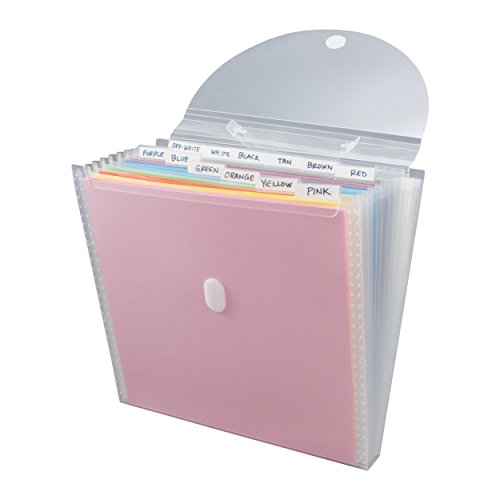
The Advantus accordion file organizer is designed to help you store important Cricut project documents, design outlines, and printed materials in one accessible place. Its expandable design accommodates growing files, while the 12 pockets provide clear categorization for different project stages, client orders, or material receipts. Constructed for daily use, this organizer supports quick retrieval during design sessions and prep work for sewing projects, card making, and vinyl layouts. Use color-coded tabs to further speed up your workflow.
Accordion File Organizer: Portable 12-Pocket Setup

This Vanulee expanding file organizer combines portability with robust storage. Its 12 pockets, handle, and snap-lock design help you move Cricut project components—like vinyl swatches, transfer sheets, and cut samples—from workspace to workshop to client meeting. The frosted exterior offers a professional look, while the internal inserts and tabs enable rapid identification of materials and project phases. Built with durable materials, it remains functional under travel and frequent use, reducing project setup time.
Cricut Transfer Tape: Clear Vinyl Transfer

Transfer tape is essential for moving vinyl designs from the cutting mat to your project surface. This Cricut roll helps you align designs precisely, ensuring clean results on signs, decals, and customized apparel. The tape is compatible with most Cricut vinyl types, including metallic and holographic finishes. For best results, apply in a steady, even motion and use a scraper tool to ensure full adhesion, especially on textured surfaces. Store rolls in the 12-pocket organizer to prevent tangling with other craft items.
Cricut Knife Blade & Drive Housing

The Cricut Knife Blade with Drive Housing expands your capabilities to cut through thicker materials, including wood and chipboard, enabling more ambitious projects like puzzles or leather goods. The 12mm carbide steel blade delivers accurate cuts for intricate designs, especially when paired with a compatible Cricut Maker machine and Design Space software. This setup supports larger or more complex patterns that go beyond standard scoring or fine-point cuts, allowing for advanced craft techniques in home décor and model-making.
Cricut Foil Transfer Tool Kit

Foil accents add a premium finish to cards, invitations, and home décor. The Cricut Foil Transfer Tool Kit provides a 3-in-1 tool for applying foil without heat, delivering polished, long-lasting results on compatible materials. This kit is valuable for designers who want to upgrade projects with metallic highlights, offering precise foil alignment and a smooth transfer process. Pair with appropriate foil sheets and transfer tape for cohesive, professional outcomes on a range of surfaces.
Buying Guide
Key purchase considerations when selecting storage and Cricut project tools:
- Storage capacity: Choose organizers with expandable features and clear pockets to accommodate growing project files, vinyl swatches, and lesson plans.
- Portability: If you frequently move between workspaces, prioritize a handle-equipped organizer and durable materials that resist wear.
- Material compatibility: For Cricut projects, match tools with your cutting needs—fine-point blades for light-to-mid materials, knife blades for thicker substrates, and foil tools for metallic finishes.
- Organization system: Use color-coded tabs or labeled pockets to separate different project stages (planning, cutting, transferring, finishing) and file types (designs, receipts, instructions).
- Accessibility: Position frequently used items within arm’s reach and consider a secondary, smaller organizer for on-desk workflows to expedite design iterations.
- Durability and maintenance: Select reinforced fans-of-file organizers and wipe-clean surfaces to maintain cleanliness in a craft space that handles glue, ink, and vinyl residues.
- Compatibility with Cricut ecosystem: Ensure blades, transfer tapes, and foil kits work with your Cricut model (Maker, Explore family) and software versions.
With the right combination of file organizers and Cricut project tools, you can maintain a streamlined workflow—from initial design notes and material inventories to precise transfers and premium finishes. This setup reduces search time, minimizes material waste, and supports consistent production of high-quality crafts.
Add a Comment