Finding the right printer for coloring pages means balancing vibrant color support, ease of use, compact design, and affordable ink or toner options. This guide compares five top options that excel at producing crisp outlines, bold fills, and clean white spaces for kids and adults alike. From inkless portable options ideal for travel to color laser printers built for school or office use, these picks help turn coloring time into a precise, mess-free experience. Below is a quick overview of the featured models and their standout traits to help you choose the best fit.
Summary of chosen products:
| Product | Brand | Type | Key Strengths |
|---|---|---|---|
| SUPVAN T200M Portable Printer | SUPVAN | Thermal Inkless Portable | 300 DPI, ultra-compact, no ink or ribbon |
| HP LaserJet MFP M234dw | HP | Wireless Color Laser All-in-One | Mobility, fast two-sided printing, strong connectivity |
| NelkoGlobal Portable Printer | NelkoGlobal | Inkless Thermal Portable | Bluetooth and USB-C, 300 DPI, long battery life |
| Brother HL-L3210CW | Brother | Color Laser Printer | Fast color printing, versatile paper handling |
| Crayola Color Wonder | Crayola | Color Wonder Coloring Set | Mess-free, scented markers and stamps, printable papers |
SUPVAN T200M Portable Printer Review

The SUPVAN T200M is a compact, inkless thermal printer designed for travel and quick on-the-go printing. It prints at 300 DPI, which supports clear lines and detailed graphics suitable for coloring page outlines and simple illustrations. With no ink or ribbon to replace, it appeals to users who prioritize low maintenance and portability. Weighing around 1.6 pounds and roughly the size of a small tablet, it slips into backpacks or briefcases, making it a solid option for students or professionals who need to print coloring sheets while away from a desk. Its 8.5″ x 11″ printing capability aligns with standard US Letter pages often used for coloring activities.
Key features include inkless thermal technology, a compact form factor, and above-average print resolution for color-line work. The trade-off is that thermal paper requires the right surface and lighting to maintain color vibrancy, and the printer’s primary strength lies in simple, portable tasks rather than high-volume color artwork. For coloring pages with defined outlines and splash fills, this model offers a convenient, low-cost entry point for travel-friendly coloring projects.
HP LaserJet MFP M234dw Overview

The HP LaserJet MFP M234dw is a color-capable all-in-one designed for small teams or busy households. It supports printing, scanning, and copying with reliable color output and strong two-sided performance. The device emphasizes speed, with up to 30 pages per minute in monochrome for single-sided jobs and efficient two-sided printing at up to 19 pages per minute. It’s compatible with mobile printing and features dual-band Wi-Fi with self-reset capability to maintain connectivity in fluctuating network environments. For coloring pages, the color laser output helps deliver crisp outlines and vivid accents on larger batches of pages or classroom worksheets.
Designed for everyday use, the M234dw balances productivity with straightforward setup and maintenance. While primarily targeted at small-office needs, its color clarity and robust paper handling make it a viable option for parents or educators printing coloring books, activity sheets, and related materials.
NelkoGlobal Portable Printer Review

The NelkoGlobal portable printer focuses on travel-ready, inkless printing with Bluetooth capabilities and USB-C connectivity for laptops and desktops. It supports 8.5″ x 11″ US Letter and A4 sizes, making it versatile for coloring pages, worksheets, and quick art proofs. With a 2600mAh battery, it promises several hours of on-demand printing and can deliver up to 150 sheets on a single roll of thermal paper. The 300 DPI resolution ensures crisp lines, which helps children’s coloring outlines stay clean and printable across different paper types. This model suits families and remote workers who need dependable, compact color-print options without ink cartridges.
Brother HL-L3210CW Color Laser Convenience

The Brother HL-L3210CW delivers fast, reliable color laser printing in a compact package. It’s well-suited for households or small offices that print coloring sheets, worksheets, and kids’ art projects in color with laser-grade precision. The printer offers quick color print speeds and versatile paper handling with a 250-sheet capacity, supporting a range of letter-sized media. This makes it ideal for families who produce large batches of coloring pages. Its emphasis on simple setup and consistent color output positions it as a practical choice for regular school-related printing tasks and creative projects at home.
Crayola Color Wonder Mess Free Set

The Crayola Color Wonder set provides a mess-free coloring experience that suits kids who want to color without staining clothes or furniture. It features Color Wonder paper, scented mini markers, stamps, and ink pads, along with blank printable pages. While not a traditional printer, the printable pages allow parents and teachers to create custom coloring sheets that align with classroom activities or home crafts. The Color Wonder system keeps coloring clean while offering creative variety through stamps and scented markers, making it a practical addition to a coloring-focused setup.
Brother MFC-L8900CDW Business Color Laser All-in-One
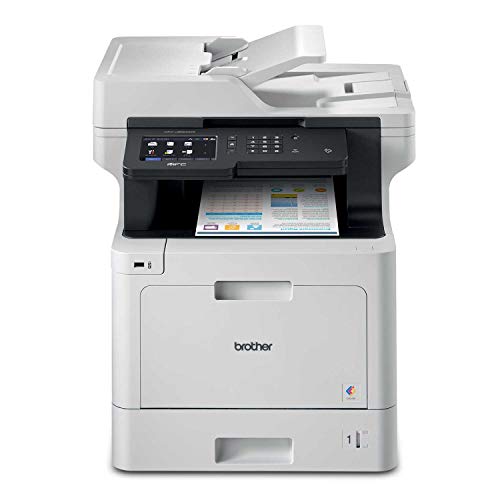
The Brother MFC-L8900CDW is a high-volume color laser all-in-one designed for business settings. It features robust scanning and copying, substantial paper capacity, and rapid color printing to support large numbers of worksheets and coloring pages in professional environments. This model prioritizes durability, speed, and volume handling, which can be advantageous for classrooms, libraries, or small businesses that require reliable color printing for educational materials and creative projects. While larger and heavier, it provides a comprehensive solution for heavy daily use and multi-user environments.
Buying Guide: Key Purchase Considerations For Coloring Pages
- Printing technology: Inkjet printers excel at photo-like color gradients, while laser printers deliver sharp text and durable color blocks. For crisp outlines in coloring pages, laser color printers offer fast, consistent results, whereas inkless thermal options provide portability and low maintenance for on-the-go printing.
- Paper compatibility: Ensure the printer supports standard coloring-page paper sizes (8.5″ x 11″ US Letter) and compatible weights. Some portable printers work best with thermal paper, which can affect vibrancy and longevity of colors on colored pages.
- Resolution: Look for at least 300 DPI for clear outlines and smooth fills. Higher DPI yields more precise lines and smoother color areas, which can enhance coloring projects.
- Portability vs. capacity: Portable inkless printers offer travel-ready convenience but usually have smaller paper trays and less capacity. Desktop color printers provide larger paper handling and faster throughput for classroom or family use.
- Connectivity and ease of use: Bluetooth, USB-C, and Wi-Fi options affect how easily you print from phones, tablets, or laptops. Self-reset Wi-Fi and robust mobile printing support reduce setup friction in busy environments.
- Cost of consumables: Ink and toner costs, as well as replacement paper requirements (thermal vs. standard ink), impact long-term expenses. For coloring pages, inexpensive paper and readily available consumables are beneficial.
- Durability and usability: For kids’ coloring, durable builds, simple interfaces, and reliable paper feeding help minimize interruptions. Consider parental controls and safety features for younger users.
- Print quality vs. volume: If you plan to print many pages weekly, prioritize printers with higher duty cycles and faster print speeds. For occasional coloring sheets, portability and ease of use may be more important.
- All-in-one features: If you also need scanning or copying for worksheets and classroom handouts, an all-in-one model can streamline workflow and reduce clutter.
Add a Comment