Giclee printing demands color accuracy, archival quality, and fine detail. The following selections emphasize reliable color output, compatibility with high-resolution art paper, and features that help reproduce gallery-worthy giclee prints at home or a small studio. Each option balances print quality with ease of use for artists and enthusiasts aiming to craft lasting fine art reproductions.
| Product | Brand | Key Strength | Ideal For |
|---|---|---|---|
| Brother Work Smart 1360 (MFC-J1360DW) | Brother | Cloud apps, duplex, fast color | Home office, art prints with color accuracy |
| HP OfficeJet Pro 8125e | HP | AI-enhanced printing, high-volume color | Home office, professional documents and art proofs |
| Canon PIXMA TR8620a | Canon | All-in-one versatility with AI-friendly features | Home office, color documents and art prints |
| Canon MegaTank G3270 | Canon | Low-cost, high-volume ink system | High print volume, color art proofs |
| HP Envy Inspire 7255e | HP | AI features, mobile printing | Creative projects, photo prints and documents |
style=”display:none;”>Introduction Summary
style=”display:none;”>This summary highlights five printers suitable for giclee-style prints, prioritizing color accuracy, archival ink capabilities, and compatibility with high-quality fine-art papers. Each product section below provides practical considerations and key features to help you compare options for studio-grade reproductions.
Brother Work Smart 1360: All-In-One for Home Offices

Designed for compact spaces, the Brother MFC-J1360DW combines print, copy, and scan functions with affordable color ink technology. It supports automatic duplex printing to help conserve paper during proofing runs. The 1.8” color display provides easy access to cloud-based workflows, enabling quick printing from Google Drive, Dropbox, Box, and OneDrive. While it targets home use, its color performance supports gallery-style proofs when paired with compatible archival papers. Its 16 ppm black and 9 ppm color speeds keep workflow steady during multi-page art document work, and the 150-sheet paper tray reduces refill interruptions during proofing sessions.
Key features include automatic duplex printing, a 20-sheet ADF, cloud app connectivity, and a compact footprint. This model is ideal for artists who want an affordable, reliable printer for proofs, color documents, and smaller giclee runs in a home or small studio setting.
HP OfficeJet Pro 8125e: AI-Enhanced Color Printing
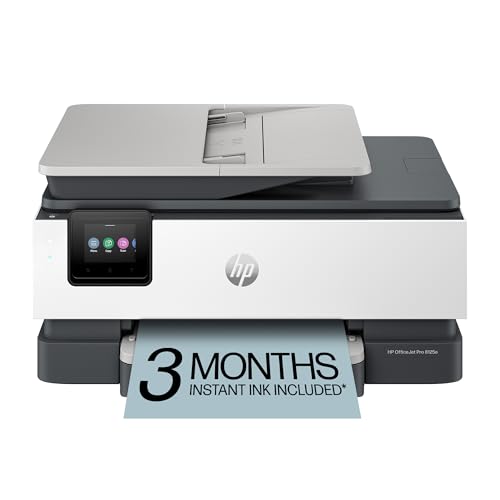
The OfficeJet Pro 8125e targets professional-grade color output with AI-assisted formatting to reduce wasted paper and optimize print layouts. It delivers up to 10 ppm color and 20 ppm black, making it capable of turning around color art proofs and posters efficiently. The printer features auto 2-sided printing, an auto document feeder, and a 225-sheet input tray, supporting larger creative projects. Its cloud and mobile printing capabilities help you send high-resolution art files from anywhere, while HP’s AI tools help streamline color matching and print fidelity for giclee-style proofs.
Consider this option when you require a robust home-office printer that can handle frequent color proofs, professional documents, and creative drafts with consistent color output across papers and formats.
Canon PIXMA TR8620a: All-In-One For Home Offices

The Canon PIXMA TR8620a offers a versatile all-in-one experience with wireless printing, copying, scanning, and fax capabilities. It supports airprint and has smart connectivity features for easy setup with Apple and Android devices. Its color management and photo printing capabilities make it suitable for light giclee work, especially proofs that benefit from Canon’s color science. The machine’s auto document feeder and duplex printing support efficient handling of multiple pages, while the 4-in-1 functionality keeps a range of creative tasks in a single device.
Ideal for artists who need an affordable all-in-one solution for proofs, color documents, and basic photo prints in a home office or studio setting.
Canon MegaTank G3270: High-Volume Ink System

The Canon MegaTank G3270 uses a high-capacity ink system designed for low running costs and extended printing sessions—beneficial for artists who produce multiple color proofs or large volumes of art prints. While it emphasizes cost efficiency, it maintains respectable color performance suitable for reproductions on compatible fine-art papers. Its wireless capabilities enable flexible placement in a studio, and the MegaTank system reduces the frequency of ink replacements, helping to maintain consistent color output during longer printing sessions.
Consider this model if you need a dependable, high-volume color printer that minimizes maintenance interruptions while working on art proofs and print runs.
HP Envy Inspire 7255e: Creative Home Printing

The HP Envy Inspire 7255e is aimed at households seeking versatile color printing with AI-assisted features. It supports mobile and wireless printing, making it convenient for creative projects, photo prints, and documents. The model emphasizes ease of use and smart printing workflows, helping to produce well-formatted proofs and color-accurate prints when paired with suitable archival papers. It’s a practical option for hobbyists and mixed-use home studios that require reliable color output and straightforward setup.
Use this model when you want an approachable, AI-enhanced printer capable of handling art proofs, photos, and everyday documents from a home setup.
Buying Guide: Key Purchase Considerations For Giclee-Style Printing
- Color accuracy and archival potential: Look for printers that support high-quality photo or pigment-based inks and offer color management options compatible with your chosen fine-art paper.
- Paper compatibility: Verify that the printer can handle art-grade, textured, and watercolor papers with appropriate weight (gsm) and surface finishes to reproduce giclee details faithfully.
- Ink system and cost per page: Consider printers with refillable or high-capacity ink tanks to keep running costs reasonable for proofing and larger print runs.
- Print quality settings: Prefer printers with advanced photo modes, color management profiles, and edge-to-edge printing capabilities to maximize print fidelity on art stock.
- Connectivity and workflow: Cloud printing, mobile apps, and compatibility with art workflows (Dropbox, Google Drive, cloud storage) can streamline proofing and collaboration.
- Duplex and paper handling: Auto duplex printing and a sufficient paper tray help with larger proof sheets and batch printing for exhibitions or portfolios.
- Print speed vs. quality balance: For proofs, you might trade some speed for higher fidelity; look for printers that offer dedicated photo or fine-art modes.
- Maintenance and reliability: A printer with reliable long-term performance minimizes downtime during critical proofing stages.
- Size and form factor: Ensure the unit fits your studio space while still providing the necessary paper capacities for art production.
- Warranty and support: A solid warranty can be valuable for artists who rely on consistent output for commissions and portfolios.
Add a Comment