Finding a printer that excels at sticker making and crafting tasks means balancing color accuracy, print quality, and user-friendly cutting or label features. This guide highlights five top picks from popular Amazon options, each offering different strengths—from all-in-one print-and-cut capabilities to inkless, portable options. Read on to compare how these devices handle photos, labels, and DIY projects, and pick the model that best fits your creative workflow.
| Product | Brand | Top Strength | Notes |
|---|---|---|---|
| Liene PixCut S1 Color Sticker Printer & Cutting Machine | Liene | All-in-One Print & Cut | AI auto-cutting, Bluetooth control |
| XenGro Mini Portable Sticker Printer | XenGro | Portable, Inkless Printing | Bluetooth, multiple rolls included |
| Printable Sticker Paper for Inkjet Printer | Joyberg | Sticker Paper for Inkjet/Laser | Matte, quick-dry surfaces |
| Sticker Printer (Tommax) | Tommax | Bluetooth Inkless Printing | Includes rolls and markers |
| ORGBRO Mini Sticker Printer X3 | ORGBRO | 2–3 Inch Printing | Bluetooth APP control |
Liene PixCut S1 Color Sticker Printer & Cutting Machine

The Liene PixCut S1 combines color printing and precise die-cutting in a single device, designed for DIY crafts, custom labels, and gift tags. Users can edit, print, and cut directly from a smartphone via Bluetooth, completing sticker projects in minutes. The AI image extraction feature helps turn almost anything into a sticker, expanding project possibilities beyond traditional designs. Prints are produced via thermal dye-sublimation at 300 dpi with 16.7 million colors, delivering vibrant, professional results. This model emphasizes streamlined workflow and versatility for creators who value speed and accuracy.
Key strengths include the integrated print-and-cut workflow, which reduces equipment clutter and setup time. The PixCut S1 is particularly appealing for scrapbookers, label makers, and small business crafters who want fast, repeatable results. Potential trade-offs may include a smaller color gamut compared to large-format printers and the need to rely on compatible media stocked from the brand ecosystem. Overall, it stands out for those seeking an all-in-one solution with smart automation.
XenGro Mini Portable Sticker Printer

The XenGro mini printer focuses on portability and inkless printing, making it ideal for on-the-go tasks, classrooms, and quick note campaigns. It uses thermal printing to deliver crisp black-and-white prints at 203 DPI without ink, providing clean sticker outputs on self-adhesive sticker paper and standard thermal paper. The device ships with several paper rolls and features easy Bluetooth pairing with iOS and Android devices. Its compact size supports pocket-sized projects, journaling, and informal gifts, while avoiding the mess and cost of ink cartridges.
Strengths include a simple setup, no-ink operation, and convenient app control for templates and basic editing. Limitations include monochrome output and reliance on compatible media, which may limit color-heavy designs. This model serves well for quick labels, inventory notes, and playful sticker ideas that don’t require color fidelity. It is especially appealing to students and hobbyists seeking a budget-friendly, mobile option.
Printable Sticker Paper for Inkjet Printer (Joyberg)

This matte sticker paper suits inkjet and laser printers, delivering vibrant color and quick-drying performance on full-size 8.5″ x 11″ sheets. Each pack contains 40 sheets with a clean liner design that helps separate the sticker from the backing. The matte finish reduces glare and helps preserve color accuracy for craft stickers, planner labels, and custom art. It supports various media applications, enabling makers to print hobby designs, product labels, or personalized gifts at home.
Strengths include broad printer compatibility and easy handling, making it a go-to option for crafters who already own an inkjet or laser printer. Potential trade-offs involve media thickness and the need for proper paper settings to prevent jams. This option pairs well with the other devices when color-intensive sticker art is required without specialized hardware.
Tommax Sticker Printer

The Tommax Bluetooth inkless sticker printer emphasizes quick, cordless performance with 200 dpi output suitable for notes, photos, and craft projects. It includes a complete starter kit with multiple adhesive rolls, printed pods, and colored thermal rolls, providing a robust out-of-the-box experience for beginners and hobbyists. The Fun Print app supports various fonts, filters, and templates to help users craft stickers and notes directly from their smartphone in minutes.
Key strengths are the comprehensive starter kit and user-friendly mobile app alignment, ideal for families and classrooms. A potential consideration is the medium print resolution, which may be less suited for professional photo work. It remains an attractive option for quick, creative sticker projects and school activities, especially when mobility and ease of use are priorities.
ORGBRO Mini Sticker Printer X3
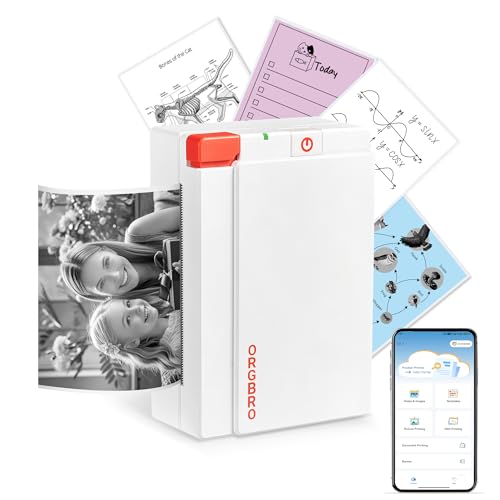
The ORGBRO X3 supports flexible 2- to 3-inch printing, making it suitable for photos, notes, and small craft projects. It delivers 300 DPI HD output via thermal printing, which yields sharper images and text without ink. The Bluetooth connection and the Snap & Tag app open access to templates, enabling direct printing from your phone gallery or social media. This model aims to balance size, resolution, and convenience for portable sticker creation.
Strengths include higher resolution and flexible print sizes, making it a solid option for hobbyists seeking portability and crisp visuals. A potential limitation is reliance on printed media and app templates, which may constrain customization for advanced designers. It is a practical choice for students, parents, and casual crafters who want reliable mobile printing with decent detail.
Buying Guide: Key Purchase Considerations
- Printer type and workflow: If you want a single device that prints and cuts, prioritize all-in-one models like the Liene PixCut S1. For portable, on-the-go crafting, consider inkless mini printers such as XenGro or Tommax.
- Print resolution and color: For vivid sticker art and photos, look for 300 dpi or higher color capabilities. If you primarily print labels or text, monochrome or lower resolutions may suffice.
- Media compatibility: Check that your chosen printer supports sticker paper, label sheets, or media types you plan to use. Some models work best with brand-specific media, others with generic paper stock.
- Connectivity and apps: Bluetooth or mobile apps can streamline editing and printing. Ensure compatibility with iOS and Android and evaluate template libraries and AI features if available.
- Media kit and accessories: Starter kits with rolls, pods, and templates add value. Consider whether you’ll need extra rolls, transfer tapes, or cutting mats for future projects.
- Safety and ease of use: For kids’ crafts, prioritize kid-friendly interfaces and safety features. For adults, ensure the device is straightforward to assemble and maintain.
- Budget and longevity: Inkless and portable options often lower ongoing costs, but initial investment may be higher for all-in-one systems with cutting capabilities. Factor in replacement media costs over time.
Add a Comment