If you’re searching for a durable, space-saving 3D print desk organizer, these five options offer solid stability, integrated filament storage, and practical workflow enhancements. They’re best for creators who need a dedicated printing station, optimized tool access, and clean cable management. The top choices vary from compact rolling carts to large, multi‑printer tables—so you can pick the setup that fits your space and print volume.
| Product | Best For | Why It Stands Out |
|---|---|---|
| GUULIBERA 3D Printer Stand | Small to mid-size studios | 3-tier design with drawer and side pockets for tools; blends wood and metal for stability. |
| ENOXEN 3D Printer Stand with Filament Storage | Filament-heavy workshops | Large filament capacity (up to 56 spools) and a metal drawer for accessories. |
| ikkle Dual‑Zoned 3D Printer Table | Two printers in one station | Two dedicated work zones with dual frames for stable, separate printing. |
| Astrastout 3D Printer Stand with Filament Storage | Mobile printing on a budget | Rolling cart with built-in power outlet and strong frame for stability. |
| AHOWPD 3D Printer Stand | All-in-one workstation with bulk filament | Three-tier with a top printer surface and bottom filament storage; sturdy and versatile. |
Note: The summary table above highlights each product’s strongest use case to help you compare at a glance. The sections below dive into details, including who each product is best for, potential limitations, and why it’s chosen for this list.
GUULIBERA 3D Printer Stand With Filament Storage Rack

Best for compact spaces with a need for organized filament access. This 3‑tier stand blends wood and metal to improve stability while housing multiple spools. A spacious center drawer is ideal for spare parts or documentation, and side pockets keep essential tools within reach. Its vertical footprint helps keep your desk clear, making it a solid choice for small studios or home workshops where space is at a premium.
Who it suits best: hobbyists or small shops that print with several filament types but have limited floor space. Why selected: it balances storage, accessibility, and aesthetics in a single package. Caution: weight and long-term wear should be monitored on the lower shelves if you frequently load heavy spools.
ENOXEN 3D Printer Stand With Filament Storage

Best for filament-heavy workflows or studios needing centralized material management. This heavy‑duty table emphasizes stability to reduce vibration during tall or complex prints. It includes a metal drawer crafted for essential hardware and a large 56‑spool open shelf, keeping your spool inventory neatly organized and away from the floor. The dedicated storage helps maintain a tidy workspace while supporting up to substantial weight on each tier.
Who it suits best: operators running multiple spools and frequent tool use during prints. Why selected: the combination of vibration control and extensive filament capacity makes it a reliable hub for busy labs. Caution: the open storage design may expose spools to dust in very dusty environments; consider a cover or shield if needed.
ikkle Dual‑Zoned 3D Printer Table

Best for dual‑printer setups where separation reduces interference. The one-piece tabletop is divided into two active zones, each with its own stability framework, allowing two printers to operate with less cross‑talk and vibration. It also includes dual‑side storage features, increasing capacity for filaments and tools without expanding the footprint. The stability and dedicated zones help maintain print quality during simultaneous runs.
Who it suits best: shops with two printers or a creator who wants clean separation between devices. Why selected: the dual‑zone layout minimizes vibration transfer and simplifies maintenance per printer. Caution: assembly may be more involved due to two independent frames; ensure level setup for precise alignment off the bat.
Astrastout 3D Printer Stand With Filament Storage, Rolling Cart
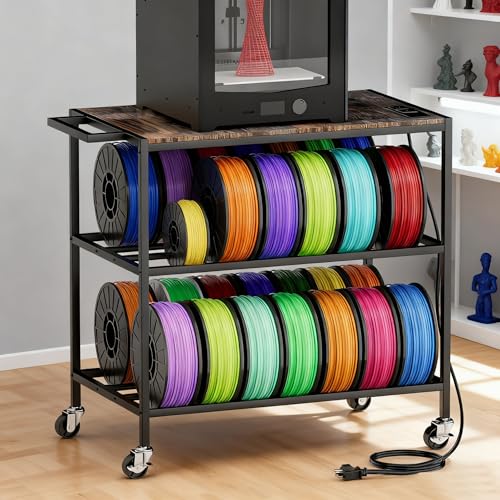
Best for mobile printing setups or spaces that require flexible positioning. This rolling cart features built‑in power outlets to power printers and accessories, a sturdy wheel system for easy relocation, and a compact footprint suited for small studios. The included power strip reduces cable clutter, helping keep work areas functional and safe during quick room changes or demonstrations.
Who it suits best: makers who move between projects or want to reconfigure their workspace often. Why selected: mobility plus integrated power access is a practical combination for versatile print environments. Caution: consider the weight limit of the rolling frame when fully loaded with printers and spools.
AHOWPD 3D Printer Stand With Filament Storage

Best for an all‑in‑one workstation that combines a stable printing surface with robust filament storage. The three‑tier design offers a top surface for the printer and lower levels for spools and accessories, while a sturdy structure supports heavy equipment. The setup prioritizes organization and efficiency, reducing clutter and helping keep essential tools within arm’s reach during production cycles.
Who it suits best: users who want one centralized station with generous storage for filaments and tools. Why selected: its layered approach provides clear organization channels and helps minimize workflow interruptions. Caution: ensure the top surface can accommodate your specific printer dimensions before purchase.
Buying Guide: Key Considerations for a 3D Print Desk Organizer
- Printer compatibility: Check the top surface size and weight capacity to ensure it fits your printer(s) and stays stable during prints.
- Filament storage capacity: Consider how many spools you need to house and whether additional shelves or side racks are required for accessibility.
- Mobility vs stability: Rolling carts offer flexibility; fixed desks tend to be sturdier for high‑vibration prints. Decide which balance suits your workflow.
- Cable management: Built‑in power strips and tidy cable routes reduce clutter. Ensure outlets meet your printer and accessory needs.
- Expansion potential: If you anticipate growth, choose a modular design or a larger table that can accommodate additional printers and storage.
- Workspace footprint: Measure your room and compare with product dimensions to prevent overreaching or crowding.
- Durability and materials: A mix of metal frames and wood surfaces often provides a good blend of stability and aesthetics, while corrosion resistance matters in humid environments.
Frequently Asked Questions
- What features matter most for a 3D printer desk organizer?
– Stability, filtration storage capacity, and accessible tool storage are key for efficient printing and consistent results. - Should I choose a rolling cart or a fixed stand?
– Rolling carts offer mobility for flexible layouts; fixed stands tend to be sturdier and better for high‑speed prints. - How many spools can a typical 3D printer stand hold?
– Capacity varies; some models hold up to 56 spools, while others offer multi‑tier storage with side racks for additional spools. - Is built‑in power storage important?
– Yes, integrated outlets reduce cable clutter and can streamline setup, especially when running multiple devices. - What maintenance considerations exist for these stands?
– Check for wobble over time, tighten fasteners, and keep surfaces clean from filament dust and debris to maintain precision.
Add a Comment