Gamers and artists who play OSU often look for a drawing tablet that offers precise input, fast response, and comfortable wear during long sessions. The following hand-picked tablets are well-suited for OSU gameplay, digital sketching, and teaching scenarios. Each option balances pressure sensitivity, ergonomics, and portability so you can draw, practice, and perform with confidence on Windows, Mac, or Android devices.
Summary of chosen products:
– XP-Pen G430S OSU, Graphic Drawing Tablet
– GAOMON S620 Drawing Tablet
– XP-Pen Deco 01 V3 Drawing Tablet
– HUION H420X OSU Tablet
– Wacom Intuos Small Graphics Drawing Tablet
XP-Pen G430S OSU: Ultra-Portable OSU Tablet

The XP-Pen G430S OSU is a compact drawing tablet designed for OSU gameplay, drawing, and quick graphics tasks. It features an active area of 4 x 3 inches and 8192 levels of pen pressure with a battery-free stylus, enabling smooth, immediate input without charging interruptions. The tablet supports both right- and left-handed use and does not require driver installation for OSU, making it a plug-and-play choice for immediate play or teaching demos.
Suitable for portable setups, the G430S emphasizes precise pen performance as a substitute for a traditional mouse. Its highly responsive pen helps deliver fast strokes and clean curves, which can enhance rhythm gaming and sketching alike. While designed with OSU in mind, its compact form makes it easy to bring to classrooms or collaborative online sessions. For those prioritizing a lightweight option that pairs well with a laptop, this model remains a strong contender.
GAOMON S620: Durable 6.5×4 Inches For OSU

The GAOMON S620 provides a larger active area at 6.5 x 4 inches with 8192 passive pen levels and four customizable express keys for quick shortcuts. It is compatible with Windows and Mac, and is commonly used for digital art, signature tasks, and OSU playing. The battery-free pen reduces maintenance and charging concerns while offering reliable tracking for precise lines, strokes, and calibration across software like Photoshop, Clip Studio, and Krita.
In OSU play and signature tasks, the S620’s passive pen supports steady control, and its portability makes it a practical choice for on-the-go students or teachers. The four express keys help streamline frequent actions, which can improve workflow during lessons or streaming OSU sessions. While it isn’t the largest tablet, it offers a comfortable balance of space, performance, and portability for learners who want more drawing real estate without sacrificing mobility.
XP-Pen Deco 01 V3: 16,384 Pressure Levels, Ambidextrous

The XP-Pen Deco 01 V3 brings 16,384 levels of pressure sensitivity and tilt support in a comfortable 10×6 inch active area, making it well-suited for OSU play, digital art, and teaching demonstrations. The battery-free stylus requires no charging and features eight customizable shortcuts, which can improve workflow for both left- and right-handed users. Android compatibility broadens options for students using mobile devices, while the tablet also works with Windows and macOS.
Beginner-friendly and ambidextrous, the Deco 01 V3 aims to minimize learning curves while maximizing creative output. The tablet’s larger surface area supports more expressive strokes and complex OSU diagrams, and the tilt sensing adds natural shading for digital art projects. This model is ideal for users who want a larger canvas without the complexity of high-end professional gear.
HUION H420X OSU Tablet: Compact OSU-Friendly Design

The HUION H420X OSU tablet offers a slim profile with a 4.17 x 2.6 inch active area and a 300 PPS report rate for quick response. Its 8192 levels of pressure sensitivity and battery-free stylus help deliver a natural pen experience with precise line work suitable for OSU gaming, online teaching, and quick on-screen notes. The device is light and compact, ideal for limited desk space and easy transport between locations.
Compatibility extends to Windows, Mac, and Android, broadening use across devices. The H420X’s compact footprint makes it a practical choice for students or instructors who need a reliable, travel-friendly board for OSU practice and annotated notes. The combination of a slim form factor with strong pen performance offers a solid balance of precision and portability.
Wacom Intuos Small: Trusted Classic For OSU And Beyond
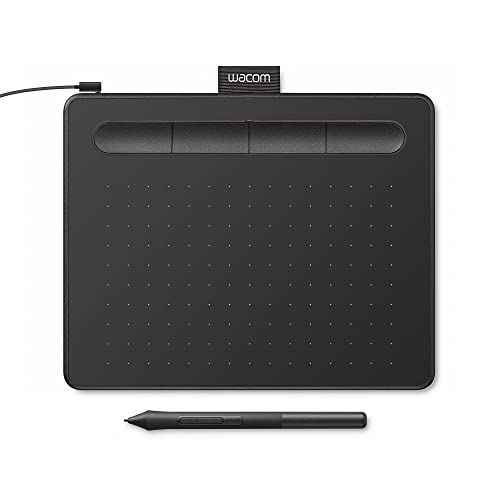
The Wacom Intuos Small delivers reliable performance with EMR battery-free technology that feel like pen on paper. It is compatible with a broad range of software, making it a versatile choice for OSU players who also want strong support for drawing, photo editing, and design work. With four customizable ExpressKeys, the Intuos offers solid workflow customization for both classroom use and personal practice. It is a proven option for students and professionals who value long-term reliability and broad software compatibility.
Buying Guide: Key Purchase Considerations
- Purpose and use case: If OSU gameplay is your primary goal, prioritize tablet latency, pen response, and a comfortable active area. For concurrent art and teaching tasks, consider tablets with larger drawing surfaces and robust software compatibility.
- Pen technology: Battery-free, pressure-sensitive pens with 8192 levels or more offer natural control. Tilt support adds shading capabilities, improving both artwork and to-the-point annotations.
- Compatibility: Ensure the tablet works with your main devices (Windows, Mac, Android) and preferred software suites (Photoshop, Clip Studio, Office, Zoom, etc.).
- Portability: For students and teachers, a slim, lightweight tablet with a small active area can be advantageous, but ensure it provides enough space for your typical strokes.
- Express keys and shortcuts: Customizable keys speed up workflows in OSU, teaching, and design tasks. Ambidextrous layouts can also help left-handed and right-handed users.
- Price and durability: While price varies, investing in a reputable brand with reliable driver support reduces long-term frustrations. Consider warranty and replacement parts as part of total cost of ownership.
- Platform ecosystems: Some brands offer Android compatibility or cross-platform apps, which can be a differentiator for students who use tablets or Chromebooks.
Picking The Right Tablet For You
Assess your OSU skill level, space constraints, and how you intend to integrate drawing into your OSU practice or teaching workflow. Those seeking portability and quick setup may prefer XP-Pen G430S or HUION H420X, while users wanting larger canvases for more complex strokes might choose the Deco 01 V3 or Wacom Intuos Small. GAOMON S620 strikes a balance with a medium active area and key shortcuts, useful for both play and classroom tasks.
Product Comparison Snapshot
| Product | Active Area | Pen Tech | Express Keys | Best For |
|---|---|---|---|---|
| XP-Pen G430S OSU | 4 x 3 in | 8192, Battery-free | 2 | Portability, OSU gameplay |
| GAOMON S620 | 6.5 x 4 in | 8192, Passive Pen | 4 | Digital art, OSU, travel |
| XP-Pen Deco 01 V3 | 10 x 6 in | 16,384, Battery-free | 8 | Beginner-friendly, Android compatible |
| HUION H420X | 4.17 x 2.6 in | 8192, Battery-free | 2 | Compact OSU, teaching, notes |
| Wacom Intuos Small | Small | EMR, Battery-free | 4 | Professional-grade reliability |
All five options provide strong OSU performance with battery-free pens, ensuring smooth lines and minimal downtime. Your final choice should align with how much drawing surface you need, how you prefer input to feel, and which devices you plan to connect for OSU practice, online classes, or creative sessions.
Add a Comment